
Last Updated: October 30, 2026
Quick Summary
The best desk accessories for remote workers are those that solve a specific daily problem, such as lower back support, long sitting, cable clutter, or dim lighting. Start with a backrest cushion, which costs about $20.64, and a seat cushion from $25.02, then add a 3-in-1 wireless charger to clear cables from your desk.
- The Memory Foam Backrest Cushion starts at $20.64 and supports lumbar alignment.
- The Memory Foam Ergonomic Seat Cushion starts at $25.02 and relieves hip and tailbone pressure.
- The 3-in-1 Folding Wireless Charger charges a phone, smartwatch and earbuds from one pad for $26.16.
- Route cables with a single power strip under the desk before buying any storage accessories.
- Check phone and watch compatibility before buying a multi-device wireless charger.
Table of Contents
- Why Your Remote Desk Setup Matters More Than You Think
- How We Chose These Desk Accessories
- Quick Comparison: Top Desk Accessories at a Glance
- Ergonomic Desk Accessories for Comfort and Posture
- Work From Home Accessories That Keep You Charged and Connected
- Desk Organization Accessories to Cut Clutter
- Desk Toys and Focus Tools for Breaks and Stress Relief
- Building Your Home Office Desk Accessories Setup on Any Budget
- Frequently Asked Questions
Why Your Remote Desk Setup Matters More Than You Think
Your desk accessories shape how you feel after eight hours of work from home. Small, well-chosen pieces like a supportive backrest, a tidy cable tray and a good wireless charger can reduce daily friction. This guide from Stuff & Such Market walks through nine desk accessories that help remote workers stay comfortable, charged and focused.
Most home offices grow by accident: a laptop on the kitchen table, a borrowed dining chair, cables piled behind the monitor. That ad hoc setup can turn into back pain, tangled chargers and a desk that never feels like a workspace. The fix is often a handful of targeted additions rather than a full redesign.
Below, we cover five categories: ergonomic comfort, charging and connectivity, organization, breaks and stress relief, plus how we chose each item and a budget-friendly way to build the setup over time.
How We Chose These Desk Accessories
When choosing items to feature, a useful test is to ask three practical questions. Does it solve a specific problem a remote worker faces? Is it simple to set up without tools or an electrician? Does it earn its place on a small desk?
Items that work across setups can be more useful than those tied to a single piece of furniture, a cushion that fits an office chair, car seat or wheelchair is one example.
Treat these picks as a starting point, not a checklist. Start with the item that addresses your biggest daily irritation, then add others as needs become clear.
Quick Comparison: Top Desk Accessories at a Glance
Quick Picks:
- Best for back support: Memory Foam Backrest Cushion
- Best for sitting comfort: Memory Foam Ergonomic Seat Cushion
- Best for charging: 3-in-1 Folding Wireless Charger
- Best for focus breaks: Transparent PC Mechanical Switch Tester
| Accessory | Starting Price | Best For | Main Benefit |
|---|---|---|---|
| Memory Foam Ergonomic Seat Cushion | $25.02 | Long sitting sessions | Pressure relief for hips and tailbone |
| Memory Foam Backrest Cushion | $20.64 | Lower back support | Lumbar alignment |
| 3-in-1 Folding Wireless Charger | $26.16 | Phone, watch and earbuds | One pad, three devices |
| Transparent PC Mechanical Switch Tester | $5.13 | Quick desk breaks | Tactile, satisfying clicks |
| Cherry Switch Tester | $16.11 | Keyboard enthusiasts | Switch feel comparison |
| Funny Stress Relief Squeeze Vent Toy | $24.51 | Desk fidgeting | Soft squeeze relief |
| Smart Digital Thermal Coffee Mug | $9.33 | Keeping drinks at temperature | Visible temperature readout |
| LED USB Rechargeable Book Light | $10.17 | Low-glare task lighting | Adjustable warm to white light |
| Plug-In Anion Air Purifier | $66.27 | Fresher indoor air | Quiet, filter-free operation |
Ergonomic Desk Accessories for Comfort and Posture
Hours of sitting place steady pressure on the lower back, hips and tailbone.
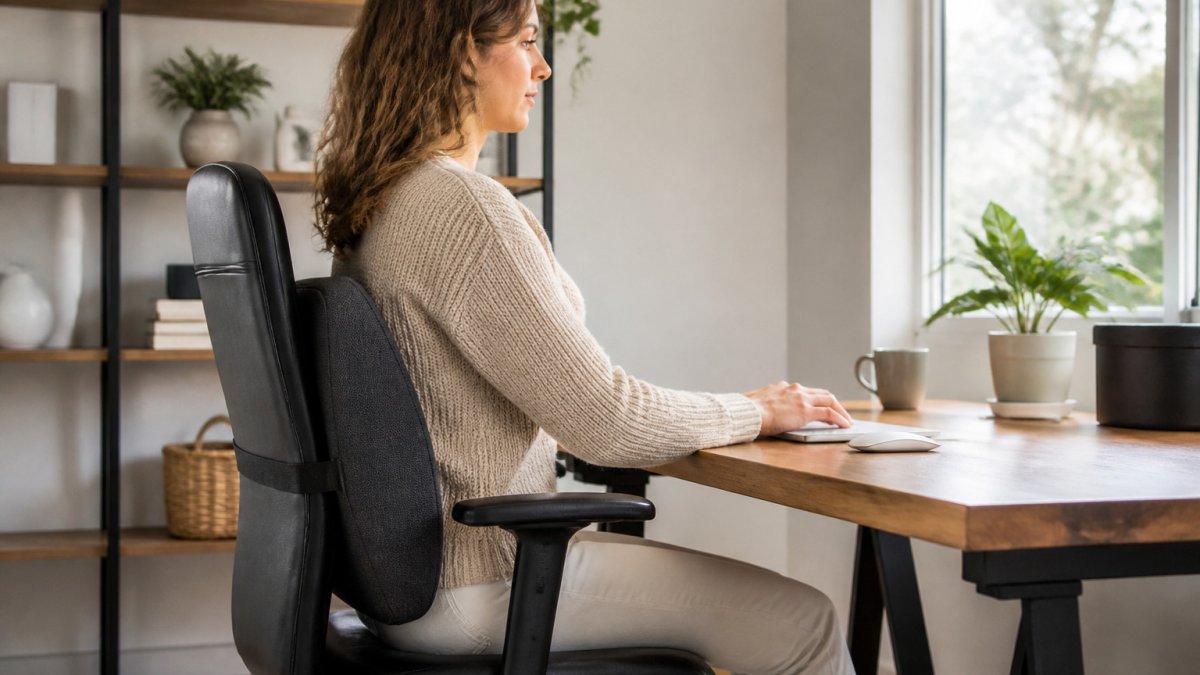
The Memory Foam Backrest Cushion supports the lower back. Its high-density memory foam conforms to the body's shape, promoting proper lumbar alignment.
The Memory Foam Ergonomic Seat Cushion addresses the other end of the body.
Pairing a seat cushion with a backrest cushion gives the most complete support, though either can help on its own.
!Remote worker seated at a tidy home desk with a memory foam backrest cushion on an office chair, natural daylight from a nearby window
Work From Home Accessories That Keep You Charged and Connected
A charging station clears the cable clutter around a laptop and phone, but not every charger suits every setup. This section covers what to check before buying, how to position a multi-device charger, and when a simpler option is better.
What the 3-in-1 Folding Wireless Charger actually solves
The 3-in-1 Folding Wireless Charger suits anyone juggling a smartphone, smartwatch, and earbuds. It charges a smartphone, smartwatch and earbuds at the same time from one pad, with 30W fast charging over USB-C. An adjustable bracket helps alignment, and the pad folds flat for storage or travel. It is available in black and white and starts at $26.16.
This model earns its space when you carry several devices. If you only charge a phone, a simpler pad takes up less desk space and costs less.
Compatibility checks before you order
Wireless charging is not universal. Before buying any multi-device charger, confirm three things:
- Phone compatibility: Check your phone's specifications for wireless charging support before ordering.
- Watch compatibility: Confirm that the charger's listing covers your watch model or brand before ordering.
- Plug type: The 3-in-1 charger uses a US plug standard. If you are outside the US, check whether you need a plug adapter before ordering.
Positioning and cable routing
Placement matters as much as the purchase. Put the charger within arm's reach of your keyboard so you can set your phone down without standing up, and route its USB-C cable along the back edge of the desk, secured with an adhesive clip.
On a small desk, the folding design lets you collapse the charger when not in use. For hybrid workers, the fold-flat form travels without taking up bag space.
When a simpler charger is the better choice
If you charge only a phone, a single-device wireless pad takes up less space and costs less. If you need to charge a laptop, the 3-in-1 charger is designed for phones, watches and earbuds rather than laptops, so check your laptop's required wattage before buying any charger.
!Remote worker's desk with 3-in-1 folding wireless charger positioned within arm's reach, USB-C cable routed along the back edge with an adhesive clip | section:charging-connectivity
3-in-1 Folding Wireless Charger – 30W Fast Charge Pad for Phone Watch & Earbuds →
Desk Organization Accessories to Cut Clutter
Clutter slows work down, and a clear surface makes it easier to find what you need. Organization is about routing cables, measuring your desk and choosing storage that fits your workflow. This section covers the moves that make the biggest difference, plus the accessories that support them.
Start with cable management, not storage bins
Cables are the number-one source of desk clutter for remote workers. Before buying trays or organizers, route what you already have.
The 3-in-1 Folding Wireless Charger described above already eliminates three charging cables (phone, watch, earbuds) from your desk surface. If you charge a laptop, route its cable along the back edge of the desk and secure it with adhesive clips rather than letting it drape across the keyboard area.
Measure before you buy
Space is the main constraint for most home offices. Before adding storage, measure three things: desk depth from front edge to wall, the width of your keyboard and mouse area, and height clearance under your monitor.
For small desks (under 120 cm wide), prioritize vertical storage over horizontal, a monitor riser with a drawer uses otherwise wasted space, while a large desktop organizer can crowd out your mouse area. For shared spaces, choose accessories that pack away or fold flat, like the folding wireless charger.
Keep frequently used items in one zone
Group chargers, notebooks and pens in a fixed zone within arm's reach, and store spare cables in one labeled box rather than a loose tangle. Move monitor stands or desk trays forward if they block your view or keyboard space. The goal is a desk where you can find what you need without standing up or digging through a drawer.
Organization accessories that earn their space
A cable tray mounted under the desk keeps power strips and excess cable off the floor and out of sight. Adhesive cable clips (often sold in packs of 10-20) route individual cables along desk edges.
If you work in a hybrid setup, choose organization accessories that are easy to move or duplicate. A second cable clip pack and a folding charger mean you can replicate your setup at home and at the office without buying everything twice.
!Desk organization setup showing under-desk cable tray, adhesive cable clips routing cables along the back edge, and a monitor riser with storage drawer | section:desk-organization
Desk Toys and Focus Tools for Breaks and Stress Relief
Short breaks help keep attention steady during a long working day. Small tactile tools give your hands something to do without pulling your focus onto a screen.
The Transparent PC Mechanical Switch Tester is a compact desk toy with four clickable test holes and a built-in LED light. It is affordable at $5.13, and it appeals to keyboard hobbyists and anyone who likes a satisfying click. The Cherry Switch Tester offers similar tactile feedback with a 2.5 m cable and a durable ABS body, starting at $16.11.
For quieter fidgeting, the Funny Stress Relief Squeeze Vent Toy is made from soft PVC and comes in several characters. At $24.51, it fits on a desk or clips to a bag.
The Smart Digital Thermal Coffee Mug also belongs here. Its 450 ml vacuum-insulated body shows the drink's temperature on a built-in display, so a cup of coffee does not go cold unnoticed while you work. It starts at $9.33.
Building Your Home Office Desk Accessories Setup on Any Budget
You do not need to buy everything at once. A staged approach keeps costs manageable and shows which upgrades matter most.
Start with comfort. A backrest cushion at $20.64 and a seat cushion at $25.02 are two affordable options to consider.
If air quality is a concern, the Plug-In Anion Air Purifier at $66.27 is the most expensive item here.
Finally, build in small treats for focus and breaks. The desk toys and mug are priced at the amounts listed above and can make a long afternoon feel lighter.
Set up your remote workspace one piece at a time.
Frequently Asked Questions
What desk accessories do remote workers need most?
Start with the items that affect comfort and daily workflow: a supportive seat or back cushion, a wireless charger that keeps your phone and earbuds powered without a tangle of cables, and a basic organizer so tools stay within reach. These three cover the most common frustrations of working from home. Once they are in place, add lighting, a desk toy for breaks, or extra storage based on how you actually work. Buying in that order keeps the early spend focused on what you use every day.
Are desk accessories worth buying for remote work?
For most remote workers, yes, as long as each purchase solves a specific problem you already have. A cushion that eases lower back fatigue after long sessions, or a charger that replaces three separate cables, pays off quickly in comfort and tidiness. Accessories bought purely for decoration are harder to justify. Think about how many hours you spend at the desk each day, then choose the items that make those hours more comfortable or efficient.
What are the best budget-friendly home office accessories?
Lower-cost options can still make a real difference. Stuff & Such Market's Cherry Switch Tester and Transparent PC Mechanical Switch Tester offer a satisfying tactile break at accessible prices. The Funny Stress Relief Squeeze Vent Toy is another affordable way to keep fidgety hands busy. Prices vary by item, so compare the current starting price for each product before deciding.
How do I make my desk more comfortable for working from home?
Comfort usually comes down to support for your lower back and posture. A memory foam backrest cushion can help fill the gap between your spine and a standard office chair, while a memory foam ergonomic seat cushion relieves pressure on your tailbone and hips during long sits. Pair them with a desk setup where your screen sits at eye level and your feet rest flat. Small changes like these tend to matter more than expensive equipment.
