
Last Updated: October 23, 2026
Quick Summary
Must have gadgets for home office address three core challenges: physical comfort during long work sessions, visual clarity to reduce eye strain, and the connectivity that keeps you focused. These include ergonomic chairs, sit-stand desks, quality monitors, mechanical keyboards, and proper lighting that together transform how you work and feel while working.
- Ergonomic chairs with adjustable lumbar support are the single most important investment in your home office workspace.
- A secondary monitor paired with a primary 24-27 inch display eliminates constant tab-switching that fragments attention.
- Budget gadgets fall into three tiers: under $50 for organization, $50-$150 for input and lighting, and $150-$400 for display and seating support.
- Monitor arms free up desk space and allow precise height and angle adjustments to prevent neck strain.
- Desk lighting positioned to the side of your monitor eliminates shadows and reduces eye strain from contrast.
Table of Contents
- Why Home Office Gadgets Matter for Productivity
- Best Home Office Gadgets for Comfort and Posture
- Work From Home Gadgets for Display and Input
- Ergonomic Home Office Accessories for Your Workspace
- Budget Desk Gadgets That Deliver Real Value
- Making Your Home Office Work in Small Spaces
- Quality, Style, and Accessibility: What Matters When Choosing
- Frequently Asked Questions
Why Home Office Gadgets Matter for Productivity
The difference between a workspace that energizes you and one that drains you often comes down to the tools you choose. Remote workers spend 40+ hours per week in their home offices, yet many treat their setup like an afterthought.
At Stuff & Such Market, we understand that productivity isn't just about getting things done, it's about creating an environment where work flows naturally.
The gadgets that matter most address three core challenges: physical comfort during long work sessions, visual clarity to reduce eye strain, and the connectivity that keeps you focused. These aren't luxury upgrades. They're foundations that determine whether your home office works for you or against you.
Best Home Office Gadgets for Comfort and Posture
Comfort drives productivity more directly than most people realize. A back posture corrector band helps maintain proper alignment during long work sessions. When your back aches or your neck tenses, focus deteriorates within hours.
Ergonomic Seating and Movement
An ergonomic chair is the single most important investment in your workspace. It's where your body spends the majority of its time, and poor support compounds over months.
Beyond seating, movement breaks matter. A desk mat designed for standing or movement encourages micro-adjustments that keep your circulation active. Some professionals add a footrest or under-desk elliptical to maintain gentle movement without leaving their workspace.
Sit-Stand Desks and Adjustability
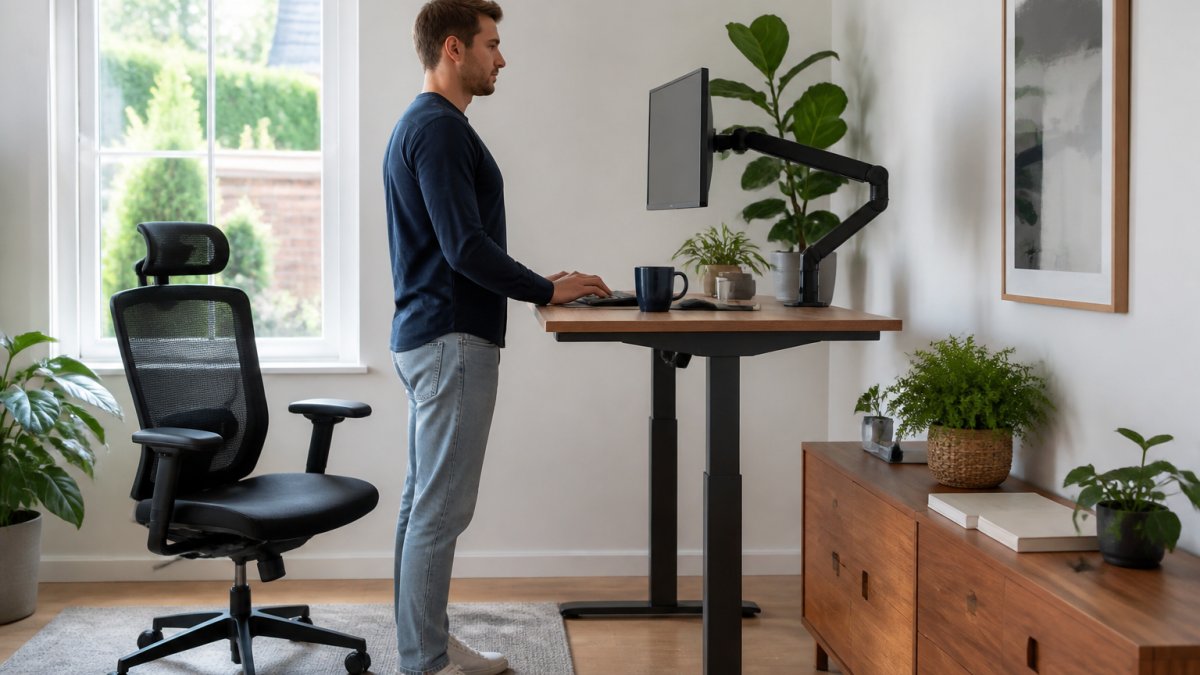
Sitting for eight hours straight isn't natural, regardless of how comfortable your chair is. Sit-stand desks solve this by letting you alternate between positions. The best home office gadgets for adjustability offer smooth transitions, either electric motors or spring-assisted mechanisms that don't require wrestling with levers.
A quality sit-stand desk shifts between sitting and standing height in seconds, making position changes feel effortless rather than like a chore. Pair it with a monitor arm that adjusts vertically, and you maintain proper eye level whether sitting or standing.
Work From Home Gadgets for Display and Input
Your eyes process roughly 30% of your visual field through your monitor. When display setup is wrong, too close, too far, at the wrong angle, eye strain accumulates silently until headaches arrive by mid-afternoon. The right work from home gadgets solve display problems before they start.
Monitors and Visual Comfort
A secondary monitor isn't a luxury, it's a practical tool that reduces window-switching friction. Most remote workers find that a 24-27 inch primary monitor paired with a second display eliminates the constant tab-switching that fragments attention.
Monitor arms deserve special mention. They free up desk space and let you adjust height and angle precisely. This adjustability is what separates a monitor setup that feels right from one that causes neck strain by day's end.
Keyboards, Mice, and Connectivity
A mechanical keyboard isn't required, but it changes how typing feels. The tactile feedback and key travel of a quality keyboard reduce typing fatigue on heavy writing days.
For mice, wireless options with ergonomic shaping prevent the wrist strain that comes from shallow grips.
Connectivity matters more than most people acknowledge. A stable Wi-Fi router positioned centrally in your home, or a wired ethernet connection if your desk is near the router, eliminates the lag that breaks concentration.
Ergonomic Home Office Accessories for Your Workspace
The best must have gadgets for home office often aren't the expensive ones. They're the thoughtful additions that solve small problems that compound into big frustrations.
Lighting and Visual Wellness
Overhead lighting creates shadows on your desk and forces your eyes to work harder. A desk lamp or light bar positioned to the side of your monitor eliminates shadows and reduces the contrast that causes eye strain.
Smart lighting that adjusts throughout the day mimics natural circadian rhythms, which matters more than most people realize (pubmed.ncbi.nlm.nih.gov). Your energy and focus follow light cues, so lighting that supports your natural rhythm keeps you sharper longer.
Audio Equipment and Video Call Setup
A quality microphone transforms how colleagues perceive you on calls. Built-in laptop microphones pick up keyboard clicks and room noise. A Bluetooth subwoofer speaker delivers high-fidelity audio for clear communication during video calls.
A webcam that captures you at eye level, with good lighting from the front rather than backlighting, makes a measurable difference in how professional you appear.
Budget Desk Gadgets That Deliver Real Value
Quality doesn't always mean expensive, but "budget" means different things depending on which problem you're solving. Instead of a flat list, it helps to think in three tiers: under $50 for organization and small fixes, $50-$150 for input and lighting upgrades, and $150-$400 for display and seating support. That structure lets you buy in the order that matches your actual pain points rather than copying someone else's setup.
Under $50: Organization and Small Fixes
Cable management clips and sleeves prevent the desk clutter that distracts your eye and makes cleaning difficult. An LED USB rechargeable book light provides eye protection and reduces strain during extended reading and screen time.
These items rarely fail, so the main trade-off is cosmetic: cheaper plastics and shorter cables. If a clip or riser feels flimsy, it usually still works, but it may not survive a move or a desk rearrangement.
$50-$150: Input and Lighting Upgrades
This tier is where most people get the biggest daily improvement per dollar. A mechanical keyboard with tactile switches reduces typing fatigue on heavy writing days, and entry-level models from established brands now sit comfortably in this range.
The trade-off here is feature creep: you can pay more for wireless, hot-swappable switches, or programmable buttons, but the core benefit (better feel, less strain) is available at the lower end of the tier.
$150-$400: Display and Seating Support
A monitor arm is the highest-leverage purchase in this tier. A posture corrector complements your seating by maintaining healthy spinal alignment and reducing back strain throughout the workday.
The trade-off is that this tier rewards patience. Chair fit depends on your height and torso length, so buying without checking seat-depth and back-height ranges is the most common mistake.
Home office gadgets fall into three price tiers, each addressing different workspace problems.
| Price Range | Best For | Examples |
|---|---|---|
| Under $50 | Organization and small fixes | Cable clips, monitor riser, charging pad, clip-on lamp |
| $50-$150 | Input and lighting upgrades | Mechanical keyboard, vertical mouse, desk light bar |
| $150-$400 | Display and seating support | Monitor arm, ergonomic chair with lumbar support |
Making Your Home Office Work in Small Spaces
Limited square footage doesn't mean limited functionality, but small-space setups fail for a specific reason: most home office advice assumes a dedicated room. When your desk shares space with a bedroom, kitchen counter, or living area, the right gadgets are the ones that disappear when you're not working. That is a different selection criterion than "best overall," and most roundups skip it.
Choose Gadgets That Fold, Clamp, or Roll Away
A wall-mounted or clamp-on monitor arm frees desk surface entirely and swings the display out of the way when the desk becomes a dining table. A compact mechanical keyboard (often called a 65% or 75% layout) takes up less room than a full-size alternative without sacrificing the keys most people use.
The trade-off is stability: clamp-mounted arms and folding stands are slightly less rigid than fixed furniture, so check the desk thickness and clamp range before buying.
Vertical Storage Beats Horizontal Storage
Floating shelves above the desk add storage without taking floor space. A vertical monitor stand stacks displays upward rather than spreading them across your surface. A pegboard or rail system on the wall holds headphones, cables, and small tools within reach but off the desk. These compound savings add up to a workspace that feels open rather than cramped.
Shared-Home and Multi-Use Room Solutions
If your office doubles as a guest room or shared living space, prioritize gadgets that mute or hide. A monitor with built-in speakers reduces the number of devices on the desk.
A common pattern is to keep a single "work box" or drawer that holds the keyboard, mouse, and headset so the desk can be cleared in under a minute.
The key is choosing gadgets that serve multiple purposes. A sit-stand desk that includes built-in cable management eliminates the need for separate organizers. A monitor arm with integrated USB ports reduces cable clutter. Match the gadget to the room's second job, not just to your workday.
Quality, Style, and Accessibility: What Matters When Choosing
Consider your actual workflow before buying. If you rarely move between sitting and standing, a sit-stand desk is wasted money.
Accessibility matters too. If you have mobility limitations, adjustable-height desks become essential rather than optional.
Stuff & Such Market curates must have gadgets for home office that blend functionality with design.
Creating a home office that works for you isn't about buying everything at once.
Frequently Asked Questions
What gadgets do you need for a home office?
Essential home office gadgets include an ergonomic chair for posture support, a monitor or second display for visual comfort, a quality keyboard and mouse for efficiency, proper lighting to reduce eye strain, and a reliable Wi-Fi setup for connectivity. Audio equipment like a microphone and headphones matters if you take video calls. Beyond these core items, cable management tools, desk organizers, and smart speakers can improve workflow and reduce clutter. Your specific needs depend on your work type and space constraints.
How can I choose budget desk gadgets without sacrificing quality?
Focus on gadgets that solve real problems in your workflow rather than trendy add-ons. Prioritize ergonomic items like a supportive chair or monitor arm, as these prevent long-term discomfort and health issues. Look for multi-functional pieces: a desk lamp with USB charging, a keyboard with programmable keys, or a monitor stand with built-in storage. Read reviews from remote workers who have tested durability over months. Start with the essentials, then add accessories once you understand what gaps remain in your setup.
Which home office gadgets improve productivity the most?
Monitor setups and ergonomic seating have the highest productivity impact because they reduce physical strain and eye fatigue, letting you focus longer. A second monitor or larger display cuts task-switching time significantly. Mechanical keyboards and precision mice improve input speed and accuracy. Proper lighting prevents headaches and maintains alertness. Smart speakers and voice control can automate routine tasks like setting timers or checking schedules. The gadgets that matter most are those that remove friction from your actual daily workflow.
What should I consider when setting up a home office in a small space?
Vertical storage and wall-mounted solutions maximize usable desk area. A monitor arm frees up desk surface compared to a traditional stand. Compact keyboards and ergonomic mice take less room than full-size alternatives. Multi-functional furniture, like a desk with built-in shelving or a lamp with charging ports, reduces the number of separate items needed. Cable management tools keep wires organized and hidden. Choose gadgets with a smaller footprint but full functionality. Portable or collapsible accessories work well if you need to reconfigure the space seasonally or share it with other household activities.
